Modly logoModlyDownload Free

Press & media

Modly media coverage

Independent publications have reviewed Modly, the free open-source local AI image-to-3D model generator that runs entirely on your own GPU. Below is what the press covered, the specs they recorded, and the screenshots they used.

FiretheringHands-on reviewMarch 25, 2026

Modly: Open Source Local AI Image-to-3D Model Generator

Firethering approached Modly as a working tool rather than a demo. Its verdict centres on the fact that a photo becomes a usable 3D mesh with no cloud step, no account and no per-generation fee — and that every layer underneath is open, so the AI model, the pipeline and the extensions can all be swapped by the user.

“Drop an image in, the AI handles background removal automatically, reconstructs the geometry, and hands you a model ready to open in Blender, Unity, Unreal, or whatever you’re working in.”
— Firethering Team, March 25, 2026

The write-up is candid about the trade-offs as well: Modly needs a capable NVIDIA GPU, and final quality tracks the input photo. For indie developers, 3D artists who want a quick base mesh, or anyone curious what local AI can actually do, the review recommends it.

Read the full article on firethering.com
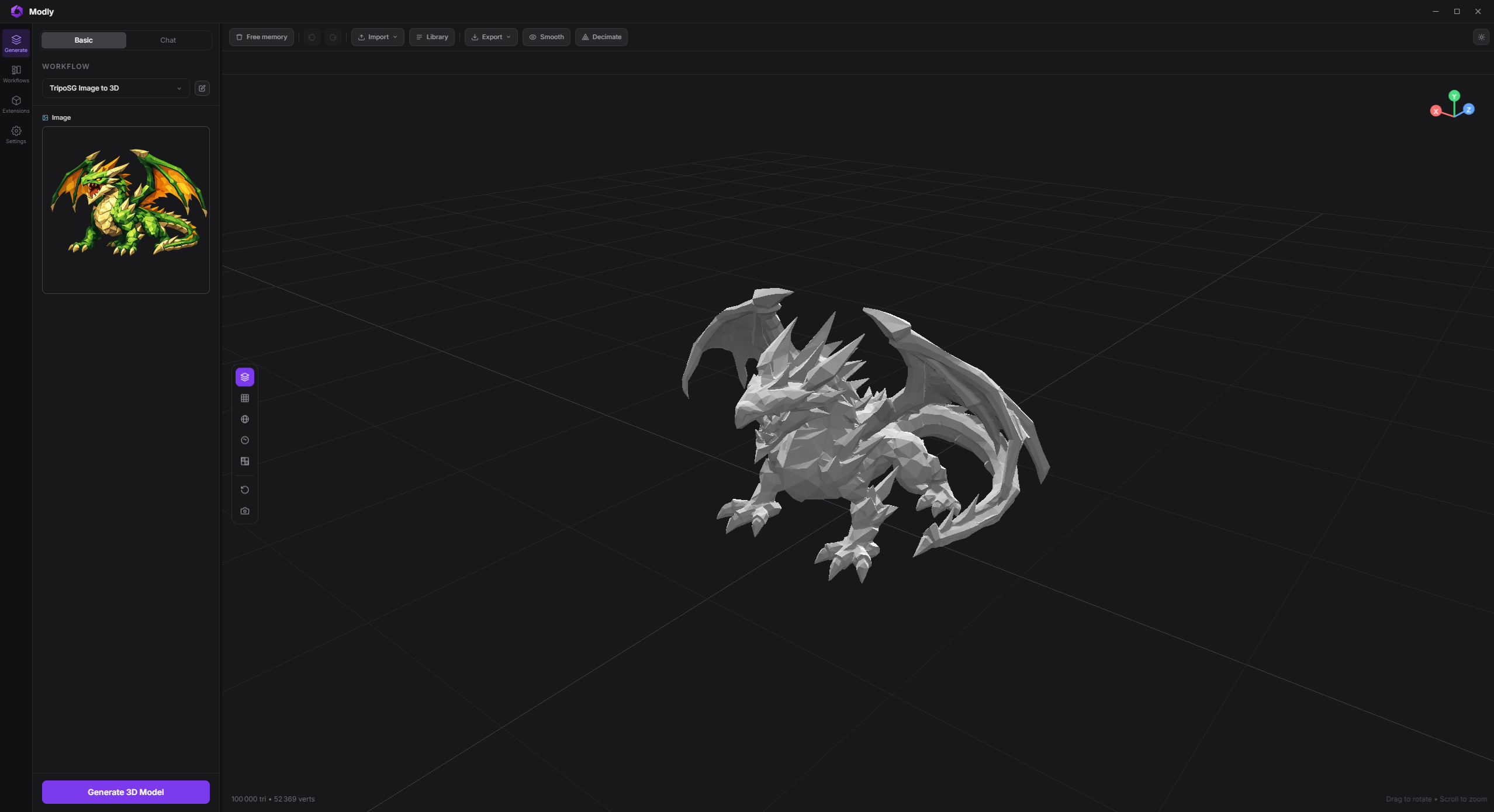

Modly 3D app screenshot reviewed by Firethering: the local AI image-to-3D model generator interface on Windows
The Modly desktop app, as shown in the coverage.

What the coverage recorded about Modly

Reviewed release
Modly v0.2.0
Reviewed by
Firethering Team
Published
March 25, 2026
Category
Software review · desktop tool
License noted
MIT (open source)
Source
github.com/lightningpixel/modly

Eight things the review highlighted in Modly

Modly runs every step on your own GPU

The review notes that all AI processing happens locally on an NVIDIA GPU — nothing is uploaded, so the image you drop in never leaves your machine.

Modly turns one photo into a usable mesh

Image in, mesh out: Modly reconstructs geometry from a single photo using open-source AI models, ready for Blender, Unity or Unreal.

Modly removes backgrounds automatically

No manual masking step — Modly strips the background before generation, so a phone snap is enough to start.

Modly previews the model before export

A built-in 3D viewer lets you inspect the generated mesh inside the app before you commit to exporting it.

Modly exports GLB, OBJ, STL and PLY

Every export drops straight into the format your pipeline already speaks, whether that is a game engine or a slicer.

Modly extensions install straight from GitHub

Swap or upgrade the pipeline by installing external model extensions from a repository URL — no forking, no manual weight juggling.

Modly keeps generations organised

Collections and a workspace view group every generated model, so a session of experiments is still searchable afterwards.

Modly works fully offline, at zero cost

After setup Modly needs no account, no cloud and no credits — unlimited local generations for free under an open-source licence.

Modly screenshots from the coverage

The images below are the ones published alongside the Modly review. Run the same workflow yourself with the free download — nothing is uploaded, so what you generate stays on your machine.

Modly 3D app screenshot: the local AI image-to-3D model generator interface running offline on a desktop GPU
Modly's workspace: generate, preview and export without ever leaving the app.
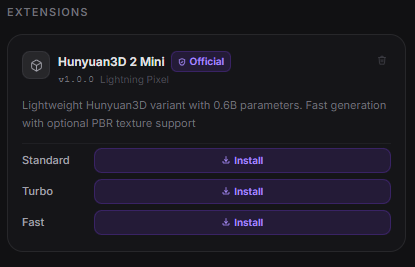
Modly 3D install from GitHub: entering an extension repository URL to swap the local AI model
Installing a Modly extension from a GitHub repository URL.
Modly 3D models page: downloading an installed AI model variant for offline image-to-3D generation
The Modly models page, where a downloaded variant becomes the active pipeline.
Modly 3D install from GitHub button inside the local AI 3D model generator
The Install from GitHub entry point in Modly's Models page.

Modly requirements, as reported

Operating systemWindows 10+ · modern Linux distros
GPUNVIDIA GPU (required for local inference)
Memory8 GB minimum · 16 GB recommended
Storage~500 MB for the app, plus space for model extensions
InternetOnly needed to download model extensions

Full details, including troubleshooting for every requirement, live in the Modly system requirements doc.

The install path the Modly coverage describes

Firethering walked through setup end to end: install the app, then install a model extension from GitHub. The three routes below are the same steps, recorded against the release it reviewed.

Modly for Windows (.exe)

141 MB
  1. 1Download the .exe installer and double-click it.
  2. 2Follow the on-screen setup instructions.
  3. 3Launch Modly from the Start Menu or a desktop shortcut.
  4. 4Open the Models page, click Install from GitHub, and add a model extension.

Modly for Linux (.AppImage)

152 MB
  1. 1Download the .AppImage file.
  2. 2Right-click it and mark it as executable.
  3. 3Double-click to launch the app.
  4. 4Open the Models page, click Install from GitHub, and add a model extension.

Modly model extensions

GitHub install
  1. 1Go to the Models page inside Modly.
  2. 2Click Install from GitHub and paste a repository URL.
  3. 3Pick a variant and download the model weights.
  4. 4Start generating — the new pipeline is active immediately.

The extension repository the review used as its example: https://github.com/lightningpixel/modly-hunyuan3d-mini-extension. More options in the Modly extensions list.

Try the Modly build the review covered

Where cloud services charge per generation and upload your images to remote servers, Modly gives you unlimited runs, full model access and total data ownership. For game developers, 3D artists, designers and researchers who want a fast, local and open alternative to paid 3D generation tools, that is exactly what it delivers.

Free, MIT-licensed, unlimited offline generations. Start from one photo, preview the mesh in Modly’s built-in viewer, and export GLB, OBJ, STL or PLY for Blender, Unity or Unreal.